 DrowUp Guide
RPA First Run
Choose a script, configure one environment, and safely check your first automated browser task.
RPA performs repeatable browser steps for you. Your first goal is not speed. It is proving that one script works with one store and one product.
Prepare the desktop client
Before starting, confirm all three items:
- The DrowUp desktop client is open.
- The intended fingerprint environment starts and is signed in to the correct store.
- The local task queue is available.
If the local queue is unavailable, DrowUp may create a cloud task record without starting the real local browser work.
Choose a script

- Open the Script Market.
- Filter by the target platform.
- Read the script description and confirm that it matches the job.
- Install the script when required.
- Select Run Now.
Configure the first run
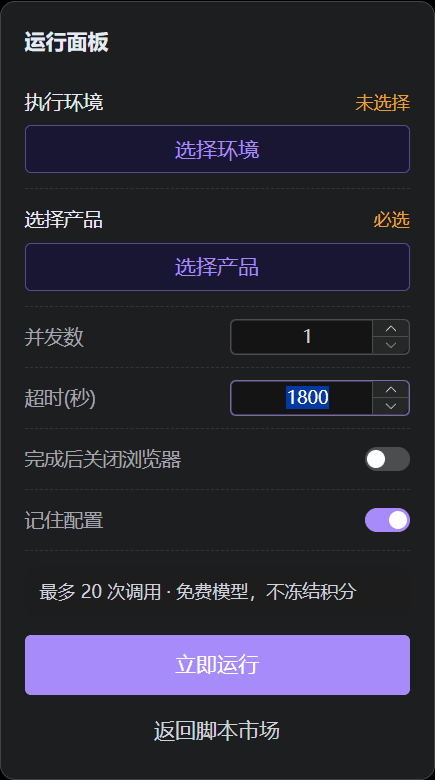
Select an environment, select a product when required, and set concurrency to 1 before the first run.
- Fill the script's required settings.
- Select exactly one fingerprint environment.
- Select one product when the script needs product data.
- Set Concurrency to
1. - Leave Close Browser When Finished off so you can inspect the final page.
- Turn Remember Configuration off when the current values are only for a temporary test.
- Check the target store and environment again.
- Select Run Now and keep the desktop client open.
Concurrency controls how many environments can work at the same time. A value of 1 makes the first run easier to watch and stop.
Remember Configuration may be enabled by default. Keep it enabled only after the settings have been checked and are useful for the next run.
Watch the browser and verify the result
The browser may open pages and fill or read content while the task is running. Do not treat an opened page as proof of success.

After the task finishes, inspect the target store or page and confirm the expected change. Also review any output file or task message produced by the script.
Check before increasing concurrency
Increase concurrency only after the same script has completed correctly several times with one environment. Higher concurrency does not fix an incorrect script setup.