 DrowUp Guide
Quick Start
Complete one simple DrowUp job from product entry to result review.
This page gives you the whole route first. The later chapters explain each part in detail.
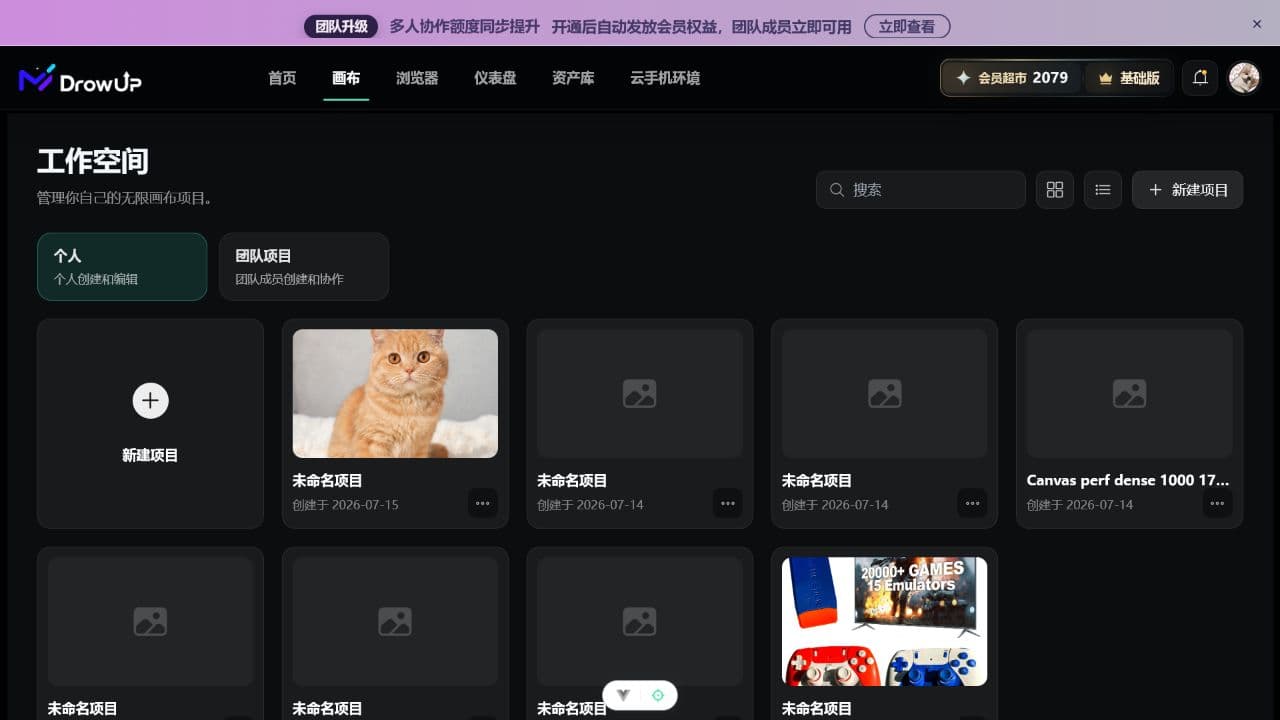
Use New Project to begin with one personal Canvas project before trying team projects.
The complete route
| Step | Where to go | What you finish |
|---|---|---|
| 1 | Asset Library - Product Library | Create one reusable product record. |
| 2 | Canvas | Add nodes, connect them, and generate content. |
| 3 | Asset Library - Generation History | Check whether the output is correct. |
| 4 | Asset Library - Material Library | Save only the output you want to reuse. |
| 5 | Browser | Create one dedicated environment for the store. |
| 6 | Script Market | Choose an RPA script and run it with concurrency set to 1. |
| 7 | Task result and target store | Confirm the task actually completed as expected. |
Before you begin
If the desktop client is not installed yet, complete Install and Sign In first.
Prepare one real or test product, including a clear product image and the basic information you already have. For the first attempt, use a small job that is easy to check.
The Canvas and Asset Library can be learned independently. Starting a fingerprint browser or an RPA task requires the DrowUp desktop client. RPA also requires the local task queue to be available.
Start small
Use one product, one browser environment, and RPA concurrency 1 for your
first run. This makes mistakes easier to find and correct.
What is saved where
- A product saved in the Product Library can be used again in later canvas projects.
- A file uploaded directly to a canvas belongs to that canvas by default.
- AI output is added to Generation History automatically.
- AI output is not added to the Material Library automatically. Save it there when you want to reuse it.
Your first success check
You are finished when all of the following are true:
- The product can be found in the Product Library.
- The canvas shows a clear input-to-output path.
- The generated result appears in Generation History.
- The useful result has been saved to the Material Library.
- The store has its own browser environment.
- The RPA result has been checked on the target page, not only in the task list.
Next: Add your first product.
Unfamiliar with a page name? Read Main Areas and Terms.